

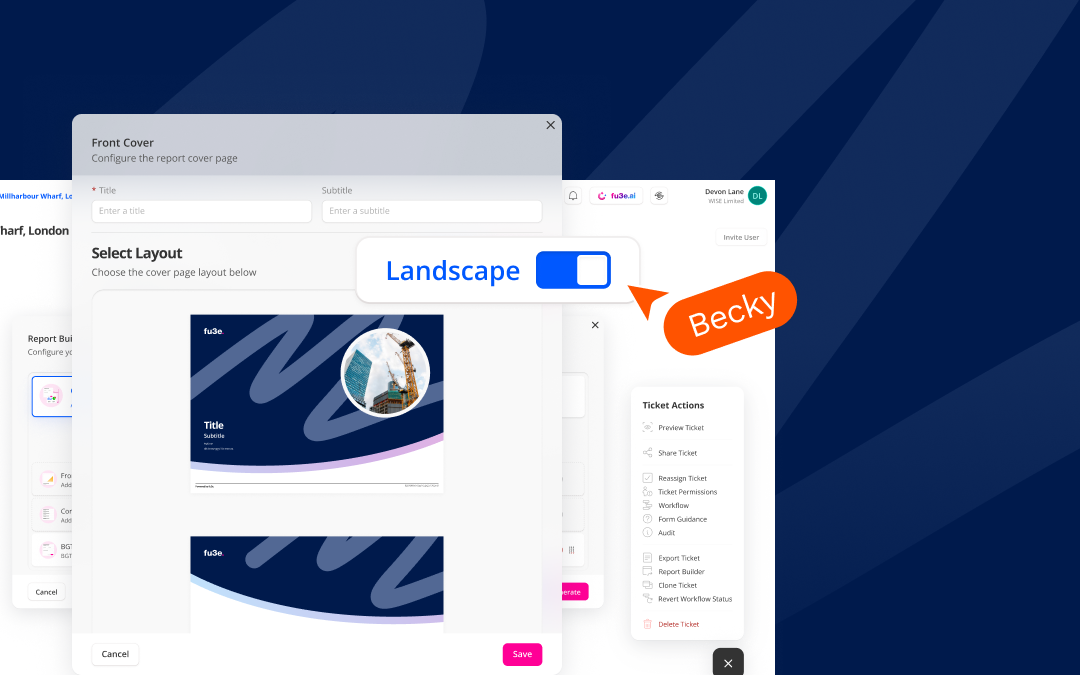
Greater flexibility across your reports
Landscape Reporting is now available in fu3e, giving you greater control over how detailed information is displayed, exported and shared.
Choose the orientation that best suits your content and take advantage of the additional horizontal space to present detailed tables, images and supporting information more clearly. Landscape Reporting works across forms, tickets, cover pages, tables of contents and complete report packs.
Forms and tickets
Administrators can configure forms in either portrait or landscape orientation. Tickets created from a form automatically inherit its selected layout and are exported in the same format.
The wider landscape layout is particularly useful for tickets containing detailed tables, multiple data fields or other content that benefits from additional horizontal space.
Cover pages
Front, back and section covers can each be configured in portrait or landscape orientation.
Previews and PDF exports reflect the selected orientation, helping you create consistent, professional report packs from beginning to end.
Tables of contents
A table of contents will use the primary form’s orientation by default, but this can be overridden with a portrait or landscape layout.
When landscape orientation is selected, you can choose between a single-column or double-column format to make the best use of the available space.
Report packs and PDF exports
Report packs support all configured orientations across tickets, cover pages and tables of contents.
Each component retains its chosen format in the final PDF, giving you the freedom to combine portrait and landscape content within a single professional report pack.
How to use Landscape Reporting
- An administrator selects the required orientation while configuring a form or cover page template.
- Create and view tickets as usual. Each ticket will reflect the orientation configured for its form.
- In the Report Builder, add or update the table of contents. You can adjust its orientation and, for landscape layouts, select a single-column or double-column format.
- Choose your front, back and section cover templates.
- Preview the complete layout and export the report pack as a PDF.
All components will appear in their configured orientations in the final export.
Available in fu3e now
Landscape Reporting makes it easier to create clear, polished reports that are better suited to detailed content.
Log in to fu3e to explore the feature today.
Interested in seeing Landscape Reporting in action? Book a free demo, or speak to your account contact for support and guidance.
.webp)






%202.avif)
.webp)



%20copy%202.webp)